AI
FinOps for AI: how to track every model call and cap spend
What FinOps for AI takes in practice. Every agent task gets a cost and every model call passes a budget check before it's sent. Then your figures have to match the provider's bill.

In this Insight
FinOps for AI is cost management for model calls. It means knowing what each AI task costs, stopping spend before it passes a budget, and proving your figures match the provider's bill. Cloud FinOps watches servers billed by the hour. AI is billed by the token, and the bill moves with every prompt, retry and agent step.
That last part is what catches teams out. A dashboard shows what an agent spent last night. It can't stop it spending tonight.
Why doesn't cloud FinOps cover AI spend?
The cloud FinOps habits still apply: tag the spend, give it an owner, look for waste. What changes is the unit. A virtual machine costs the same whether it answers one question or a thousand. A model call costs whatever its tokens cost, and the number of calls depends on what the software decides to do at runtime.
A chat feature has a cost per message. An agent has a cost per task, and one task can mean anything from a handful to dozens of model calls, a few tool calls, two retries and a summary of its own output. The user sees one answer. The bill sees all of it. Gartner predicted in June 2025 that over 40% of agentic AI projects will be canceled by the end of 2027, with escalating costs among the reasons. A project can't defend a cost nobody can see.
The FinOps Foundation's own material says there is no accepted method yet for allocating multi-agent cost. The rest of this article is one: what to record, where to enforce, how to allocate agent and multi-agent runs, and how to check the numbers against the invoice.
FinOps for AI in three layers: gateway, observability, reconciliation
Three layers, each with its own tooling.
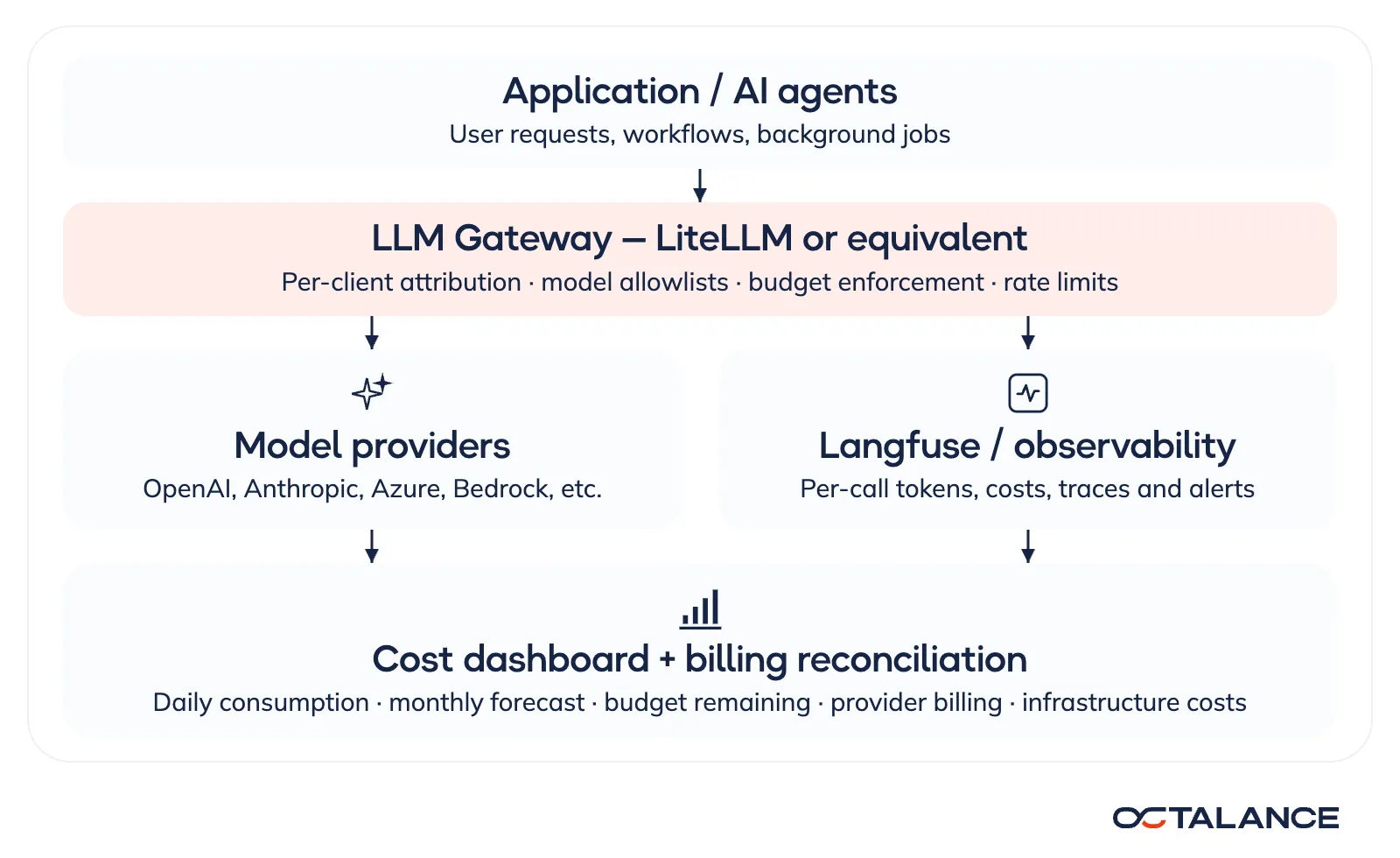
| Layer | What it does | Typical tools |
|---|---|---|
| LLM gateway | Routes every model request, applies the approved model list, ties each call to a team or project, enforces rate limits and budgets | LiteLLM or an equivalent gateway |
| Observability | Records tokens, cost, latency, retries and the full trace of each workflow | Langfuse, LangSmith, Phoenix, or an existing telemetry stack |
| Reporting and reconciliation | Shows spend, budget left and the month-end forecast, and compares recorded cost with provider billing | A BI dashboard plus the provider's usage and cost APIs |
For a small application on one provider, a separate gateway can be overkill. The same controls can live in the service that owns model access, as long as nothing else in the system can call a model directly. One path that skips the check is enough to make every budget figure fiction.
What every model call should record
Each call should answer three questions. Who or what started it? Which model handled it? What did it cost? In practice that is a short record.
- Attribution: timestamp, environment, customer or tenant, project, team, application, agent, and three IDs (the run, the call, and the call that caused this one).
- Model: provider, model and version or deployment, plus the pricing tier where the provider has several.
- Usage: input tokens, cached input tokens, output tokens, and anything billed separately, such as cache writes or tool calls.
- Execution: latency, success or failure, retry count, agent iteration count, and whether a fallback model answered.
- Cost: estimated cost in USD and the version of the price table used.
Two habits keep the estimate honest. Take token counts from the provider's response instead of counting them from the prompt text yourself, and check whether its input count already includes cached tokens before you price it. OpenAI's does and Anthropic's doesn't, according to their prompt-caching guides, so a formula written for one counts cached tokens twice on the other. And version the price table, because model prices change and last quarter's calls should keep last quarter's prices.
One caution. Traces can hold prompts, outputs, retrieved documents and tool arguments. Cost reporting needs only the metadata, so full prompts shouldn't be logged by default just to count tokens. Redaction, access control and retention limits apply to traces as they do to any other store of client data.
How much does one request cost, and one agent run?
For a text model priced separately for uncached input, cached input and output:
cost = ( uncached_input_tokens × uncached_input_price
       + cached_input_tokens   × cached_input_price
       + output_tokens         × output_price ) / 1,000,000
Prices are per million tokens. Real bills add more lines: cache writes, long-context tiers, batch discounts, service tiers, tool fees, embeddings, audio and images.
Reasoning models hide part of the output. OpenAI's reasoning guide says the tokens such a model spends thinking are billed as output tokens but don't appear in the answer, so the output line can be far larger than the reply.
Take an illustrative price list: $3 per million input tokens, $0.30 per million cached input tokens, $15 per million output tokens. These are round numbers for the arithmetic, not any provider's current rates.
A single chat request sends 6,000 input tokens, 4,000 of them a cached system prompt, and gets 500 tokens back. That is (2,000 × 3 + 4,000 × 0.30 + 500 × 15) / 1,000,000, or about 1.5 cents.
Now give the same question to an agent. It plans, works through four tool steps, retries the last one and writes a summary. Each step resends the conversation so far, so the input grows. No caching is assumed in this run.
| Call | Input tokens | Output tokens | Cost |
|---|---|---|---|
| Plan | 3,000 | 400 | $0.0150 |
| Step 1 | 5,000 | 300 | $0.0195 |
| Step 2 | 7,000 | 300 | $0.0255 |
| Step 3 | 9,000 | 300 | $0.0315 |
| Step 4 | 11,000 | 300 | $0.0375 |
| Step 4, retry | 11,000 | 300 | $0.0375 |
| Summary | 12,000 | 600 | $0.0450 |
| Run total | 58,000 | 2,500 | $0.2115 |
Seven calls, about 21 cents, roughly fourteen times the chat request. Part of that gap is the cache the chat request had and the agent run didn't. Most of it is the agent paying again and again to reread its own history, which is input, about 80% of the run's cost. That is why caching and context trimming move agent cost more than a cheaper output price does, and why the retry line deserves a cap of its own.
Cost allocation in agent and multi-agent systems
Attribute by cause. Every call carries the ID of the run it belongs to, its own ID, and the ID of the call or agent that triggered it. Cost then rolls up three ways without guesswork:
- By run, which gives cost per task, the number the business cares about.
- By agent or role, which shows whether the planner, the researcher or the reviewer is the expensive one.
- By customer, team or project, which comes from the run's owner, so a sub-agent never needs its own tags.
In a multi-agent system the same rule holds. An orchestrator that hands work to three workers in parallel produces four branches under one run ID. The orchestrator's own calls stay on that run. They aren't split across the workers by formula. A shared component that serves many runs, such as an embedding index rebuilt nightly, is the one place where an allocation key is needed. Split it by usage share, and label it as allocated so nobody mistakes it for a measured cost.
Then report cost per successful task. Take a month with $420 of model spend, 12,400 model calls and 3,500 completed tasks. Cost per call is just over 3 cents. Cost per completed task is $0.12, and only that figure tells you whether the feature pays for itself. (The figures are an illustration.)
Where should the budget check sit?
In the request path, before the call is sent, on every route that can reach a model, background jobs and agents included. A check that runs after the fact is a report.
Every budget belongs to someone who can approve a change: a client, a product, a team, a workflow or an environment. API keys are issued per owner, so spend is attributable from the first call, and every budget has a stated reset period. Alerts fire as spend approaches the limit, for example at 80% and again at 95%, and when consumption speeds up in a way that looks like a runaway process. An agent stuck in a loop shows up as a rate change long before it shows up as a total.
At runtime, only approved models can be called. Requests, tokens and concurrent calls are capped. Agents get a maximum number of iterations and a finite number of retries, and where it makes sense, each run gets a cost ceiling.
The precise version of the check uses a reservation. Before the call, the gateway estimates the most it can cost: the input tokens at the input price plus the maximum output tokens, reasoning tokens included, at the output price. It reserves that amount against the budget, sends the call, then settles the real cost from the provider's usage figures and releases the difference. Concurrent requests can't all slip through on the same remaining balance, because each one has already claimed its share.
Someone also has to decide in advance what happens at the limit. A call already in flight finishes. The next call in the run is refused, so the agent should stop cleanly: save its state, return what it has, and say why it stopped. For new work, the system might reject requests, queue what can wait, ask for approval to raise the budget, or switch to a cheaper model that has passed the same tests. That last option needs care. On a task where accuracy or safety is the point, a weaker model is a bad trade.
Here is how such a policy might look for one project. The values are an example.
| Control | Example value | What happens |
|---|---|---|
| Monthly project budget | $1,000 | All model spend for the project counts against it |
| First alert | 80% of budget | The project owner and engineering are notified |
| Critical alert | 95% of budget | Escalation, and a review of the month-end forecast |
| Budget reached | 100% | New chargeable tasks are blocked or queued unless an exception is approved |
| Per-run ceiling | $2 | The agent stops and returns its partial result |
| Agent execution | Iteration cap, bounded retries | Loops end instead of repeating calls |
| Model access | Approved list only | No accidental calls to an unapproved or far pricier model |
Is a software budget a hard limit?
Close, but not absolute, and it's better to know that before you rely on it. Providers post usage with a delay, a gateway may cache its spend counters, and any call that goes around the gateway isn't counted at all. A tighter limit needs a shared, persistent spend store, the reservation step above, concurrency tested under load, and a rule for what happens when the spend state can't be read.
Cloud billing budgets are weaker still. Microsoft's documentation for Azure Cost Management says budgets send alerts and don't stop resources or consumption. If AI work must stop at a threshold, the stop has to live in the gateway or the application.
OWASP lists this risk as LLM10:2025, Unbounded Consumption, which includes attacks designed to run up a target's inference bill. A budget that only alerts doesn't cover it.
Reconciling your figures with the provider's bill
Treat it as a procedure with a schedule and a tolerance.
- Keep two figures apart. Your own records give a near-real-time estimate. The confirmed charge comes from whoever bills the call. For calls made straight to a model provider, that is the provider's usage and cost API, which OpenAI and Anthropic both publish for organization admins (Anthropic's is in beta at the time of writing). Models called through Amazon Bedrock, Azure OpenAI or Google Vertex AI are billed on the cloud bill, so the source there is the cloud's cost export (AWS Data Exports, Azure Cost Management exports, or Google Cloud's billing export to BigQuery). Show both figures on the dashboard, with the time the billing data was last refreshed.
- Compare daily, per model, once a day's usage has settled. Providers post usage late, so a same-day comparison mostly measures lag.
- Use the provider's billing day boundaries, not your local time zone, or every day will be off at both ends.
- Agree a tolerance, say 2%, and investigate any model-day outside it. The usual causes are late usage, calls that skipped the gateway, credits, negotiated rates, pricing-tier changes, and a price table that wasn't updated.
- Close the month against the invoice, and record the difference and its cause.
The FOCUS specification, an open billing-data format supported by the FinOps Foundation, is a sensible shape for the combined dataset if the company already reports cloud spend that way.
Model charges are also only part of what an AI feature costs to run. Compute, orchestration, databases, vector search, storage, networking, the observability stack itself and third-party tools can change the total a lot. They belong in the same report, each on its own line, instead of being folded into a blended "cost per token".
Is the cheapest model the cheapest way to get the answer?
Often it isn't. A cheap model that needs three attempts can cost more than a stronger one that gets it right the first time, and it costs a person's review time on top. Cost per successful task is the number to optimize, with quality measured next to it.
What usually moves that number:
- Model routing. Routine work goes to a smaller approved model, and harder tasks go to one that meets the quality bar. Choose the model per task, weighing answer quality, latency and cost, and on a generative AI build make that choice at design time.
- Context discipline. Trim old conversation history, retrieve only the documents the task needs, and stop resending a large prompt when a short summary would do. The agent run above shows where this pays.
- Caching. Reuse stable prompt prefixes, or the provider's prompt cache, where the workload and the privacy rules allow it.
- Agent design. Clear stop conditions, a budget for tool calls, finite retries, and a guard against an agent calling itself.
- Evaluation. Every change to a model, prompt or workflow is scored on accuracy, latency and review effort as well as cost.
The review question after each change is short. Did cost per successful task go down, and did quality hold? Put a cost per task in the go-live bar for an AI agent, next to the pass score, and that question has a number before launch. On the AI builds we deliver, per-call cost tracking and budget limits are part of the build.
Where do you start with an AI system that's already running?
Start by finding every place a model gets called. A new platform can wait.
- Inventory and baseline. List the providers, every access path, the agents and background jobs, the billing accounts and the logging already in place, and pull the last month of usage. Name a technical owner and a budget owner.
- Record complete usage. Put every provider's usage into one schema, add the run and parent IDs, and build a first dashboard of daily spend, attribution and cost per successful task.
- Add enforcement. Approved models, rate and concurrency limits, bounded agent execution, alerts, and the agreed rule for an exhausted budget. Then test that no production path can call a model around these controls.
- Reconcile and tune. Run the daily comparison, explain the gaps, adjust the alert levels, and benchmark cost against quality before usage grows.
A convincing demonstration of all this has three parts: a dashboard on real usage, a configured policy, and a test that shows what happens when the limit is reached.
What to ask any team building AI for you
Ask where model calls are recorded and whether agent sub-calls are grouped by run. Ask what blocks a call when a budget is spent, and whether any path skips that check. Ask for cost per completed task. And ask to see last month's recorded spend next to the provider's invoice.
If those answers come back specific, the model spend is under control. If the answer is a screenshot of a dashboard, it is only being watched.
FAQ
Our models run through Amazon Bedrock or Azure OpenAI. Does that change the setup?
Less than it seems. The spend arrives on the cloud bill you already review, so your cloud FinOps owners and reports already cover it. That bill knows the account, the resource and the model. It doesn't know which agent run or customer a call served, so attribution and budget checks still come from your own per-call records. Our AI builds can call their models through the client's own Amazon Bedrock, Azure OpenAI or Google Vertex AI account, which keeps the model spend on that one bill.
Do we need an LLM gateway such as LiteLLM?
Not always. With one provider and one service that owns every model call, budgets and limits can live in that service. A gateway earns its place once there are several providers, several teams, or agents and background jobs that would otherwise each need their own controls.
Can an observability tool like Langfuse enforce a budget?
Observability tools record usage and cost per call and can alert on it, but they sit beside the call path. A call is blocked only by something in the path, which is the gateway or the application's own model-access layer.
Why not just use the provider's usage dashboard?
For calls made straight to the provider it's the source of truth for the bill, so reconcile against it. A model reached through your cloud account bills on the cloud bill instead. It can't tell you which agent, workflow or customer caused a charge, and its data arrives with a delay. Attribution and real-time limits have to come from your own records.
How long should we keep traces?
Keep the two kinds of record on different clocks. The cost record is small and holds no client content, so it can stay as long as your other billing records, which lets finance reopen any closed month. Full traces with prompts and outputs are debugging material. Give them a short retention, days or weeks, and keep a longer copy only of the runs someone flagged for review.
How do we set a per-run ceiling?
Measure first. Run the agent over a realistic set of tasks, or replay a week of real ones, and look at what the successful runs cost. Set the ceiling a little above the costliest normal success, so a hard task still finishes and a loop doesn't. Then read every run that hits it. Each one is either a loop worth fixing or a sign the ceiling has to move, which usually follows a change of model or prompt.
